Behind the feature
The Reference Graph: See How Everything You Read Connects
Most reading tools help you capture a quote and then quietly file it away forever. The reference graph does the opposite: it draws the lines between everything you've saved, so the idea a Stoic raised in one book and a neuroscientist echoed in another finally sit in the same picture. Here's the problem it solves, why we built it, and how to use it.

The problem: highlighting is storage, not thinking
If you're a serious reader, you already capture quotes, in a highlights app, a notes file, a stack of index cards. The trouble is that capture is where almost every tool stops. Each quote lands in a long, flat list, sorted by the date you saved it, and there it stays. You end up with a beautifully organized archive that you never actually reopen.
But the value of what you read was never in any single highlight. It's in the connections: the argument that shows up in three different books under three different names, the author who quietly contradicts one you read last year, the theme you didn't realize you'd been circling for months. A flat list hides every one of those. You can only see them if you happen to remember both ends at the same moment, and memory almost never obliges.
This is the same limit the old commonplace book tradition ran into on paper. The most powerful way to organize your reading has always been the networked one, entries linked to other entries rather than filed under a heading, and it's also the one that's nearly impossible to maintain by hand. You can't easily draw a line from a note in one notebook to a note in another. The reference graph exists to make that networked view effortless and automatic.
What the reference graph is
The reference graph is a living map of your library. Every book you own and every quote you've saved becomes a node, and ZenRead draws the relationships between them as lines you can actually see and explore. It renders on a calm, dotted canvas you can pan, zoom, and rearrange with your fingers.
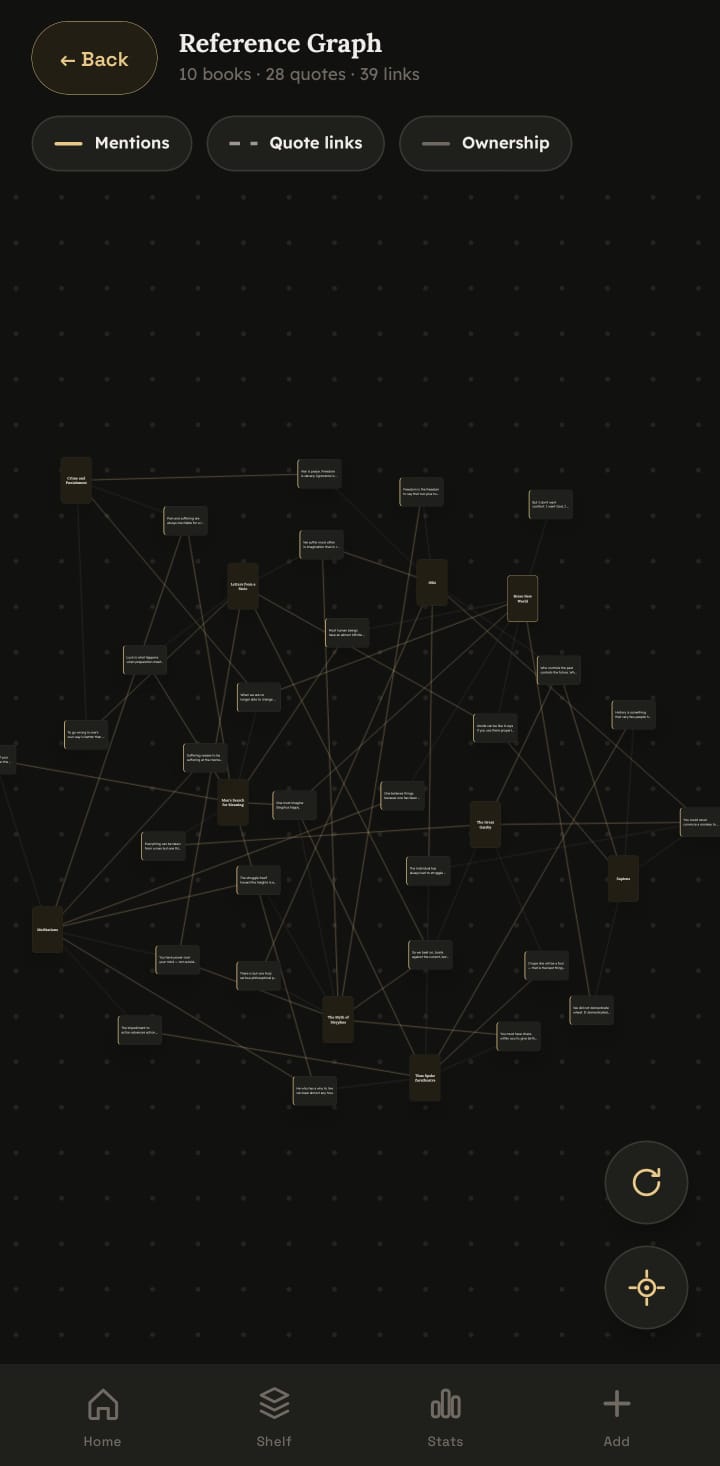
There are three kinds of link, and each answers a different question:
- Mentions, a quote that points to a book. When a passage references another title, that connection is drawn as a solid line, so you can see which books talk about which others through your own notes.
- Quote links, a quote connected to another quote, often from a different book. These are the dotted lines, and they're the heart of the feature: the moment two ideas from two authors turn out to be the same idea, you link them, and the graph remembers it forever.
- Ownership, the quiet structural link between a book and the quotes you took from it. It's what makes each book a small hub with its passages orbiting around it.
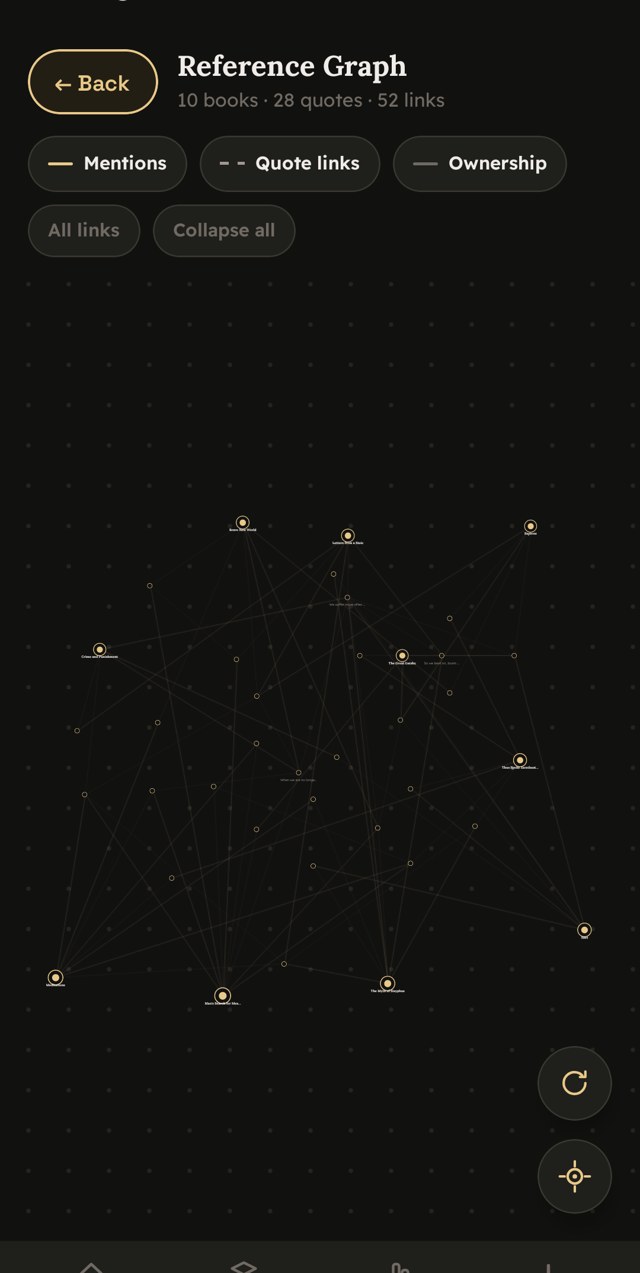
The header keeps a running count, 10 books · 28 quotes · 52 links, so the graph doubles as a quiet measure of how connected your reading has become.
Why we built it
ZenRead started as a calm place to keep the lines worth keeping. But the more quotes people saved, the clearer the missing piece became: a collection that only grows is just a bigger pile. What turns a pile into a second mind is structure, the ability to walk from one idea to a related one and back, the way you would in your own head on a good day.
Tools for that kind of networked thinking already exist for knowledge workers, the Zettelkasten method, the graph views in note-taking apps built for connected thought. What none of them are built for is reading: they assume you're writing your own notes from scratch, not collecting and connecting other people's best sentences. We wanted the power of that connected view, aimed squarely at the reader, and kept as calm as the rest of the app, no productivity dashboards, no streaks, no noise. Just your books, your quotes, and the lines between them.
Reading furnishes the mind only with materials of knowledge; it is thinking that makes what we read ours. The graph is where that thinking becomes visible.
How it works in the app
The graph is built to be handled, not just looked at. Everything runs under your finger:
- Pan and pinch to move around the canvas and zoom from a single book all the way out to your entire library in one view.
- Hold and drag any node to arrange the map the way your mind sees it, and your arrangement is saved, so it's exactly where you left it next time.
- Tap a node to spotlight it. Its direct connections light up while everything else dims, so you can read one idea's neighbourhood at a glance. Tap a neighbour and the spotlight walks with you, one hop at a time across your reading.
- Tap again to open the quote or book in full.
A large, well-read library can get dense, what graph people affectionately call a "hairball", so the reference graph ships with tools to calm it down. A tap on the legend chips toggles any link type on or off. A Top 6 / Top 3 links control thins each node down to its strongest connections. And Collapse all folds every book's quotes back into the book itself, giving you a clean book-to-book overview before you dive back in.
What it feels like to use
The first time the graph pays off is usually an accident. You're following a quote about attention from one book, you tap its neighbours, and a line runs off to a passage you saved eight months ago from a completely different author making the same point in different words. You never would have put those two together from a list. On the graph, they were one tap apart.
Over time the shape of your own reading starts to show. The books you've thought hardest about grow into visible hubs, thick with connections. Themes you didn't know you had cluster together. The map becomes less a picture of what you've read and more a picture of how you think, which is exactly what a commonplace book was always meant to become, and what makes it such a powerful companion to remembering more of what you read.

Free to explore, Pro for the full picture
Exploring the reference graph is free. Open it any time and you'll see your most recent books and quotes already mapped and connected, enough to feel exactly how the feature works on your own reading, with no account required and nothing to pay.
Pro lifts the cap so your entire library becomes one connected constellation instead of just its most recent corner, and it unlocks quote-to-quote links so you can draw connections between passages across every book you own. (Capturing quotes, by typing, scanning an ISBN, or photographing a page, is always free; Pro is about connection and sync, never about getting your words in.)
Built on your device, and only yours
One thing worth saying plainly: the reference graph is assembled entirely on your phone, from your own library. There's no server drawing conclusions about your reading, no analytics, no profile. The map of how your mind connects ideas is one of the most personal things software could hold, so ZenRead is built so that it never leaves your hands.
See your own reading as a graph
Save a few quotes, link a couple of ideas, and open the reference graph. It's calm, it's private, and it turns your library into something you can actually explore, free to start, no account needed.
Get ZenRead on Google Play